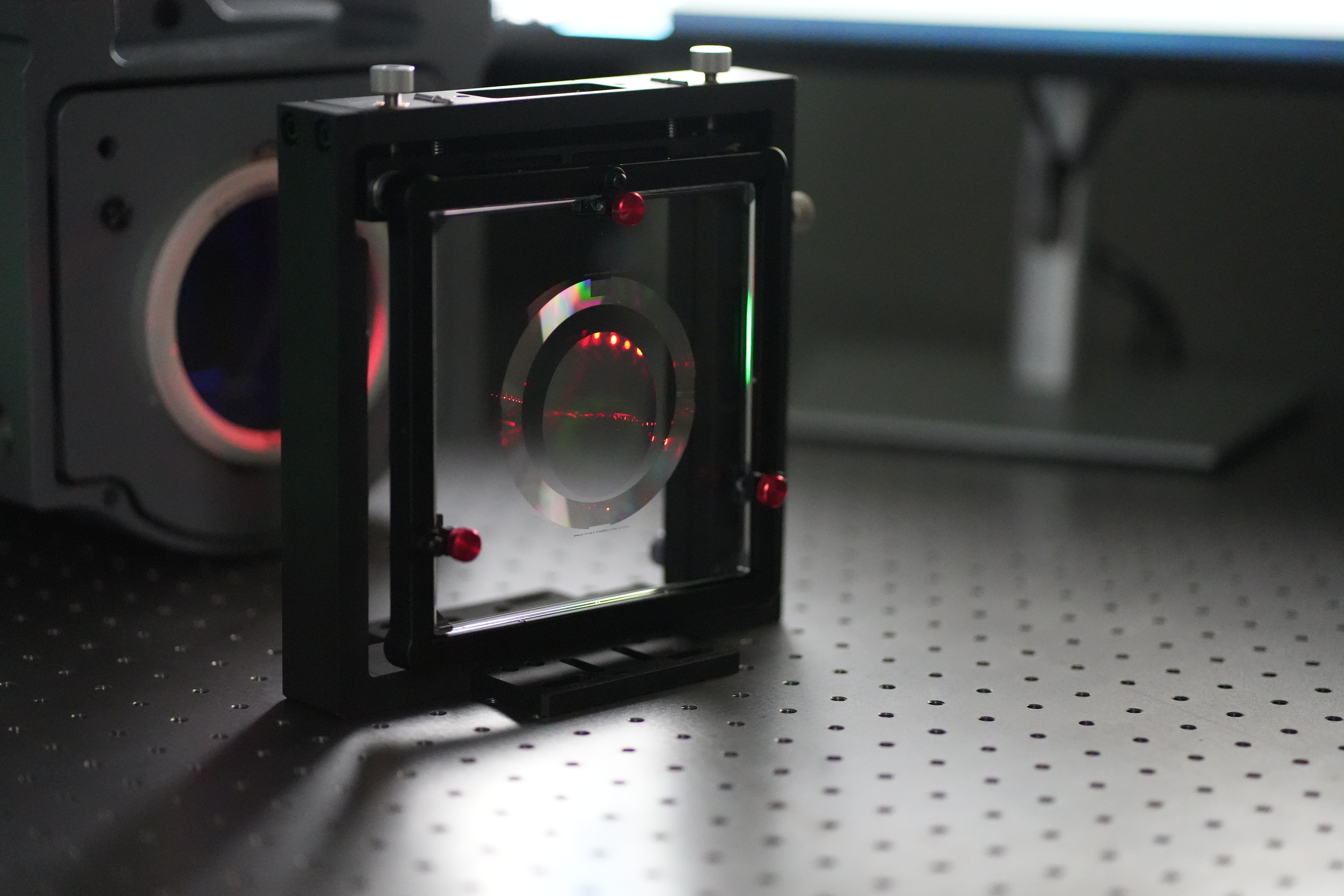
In the optical manufacturing industry, many people working with cylindrical lenses have encountered this awkward moment: a salesperson has just received a client's cylindrical lens drawing, or R&D has just finished designing a new lens, only to hand it over to the process or testing engineer. Everyone gathers around the drawing, inevitably wondering:
"What CGH model should this cylinder be paired with for testing?"
"Which direction is its Fno calculated? How do I match the interferometer to avoid overflow?"
Indeed, selecting a cylindrical CGH has always been a technical task. You need to calculate the radius of curvature, determine the generatrix direction, and consider the interferometer's aperture. Manual calculations are time-consuming and prone to errors.
Testing shouldn't be this painful.
To allow everyone to completely say goodbye to the era of "blindly guessing" the model from drawings, we have developed an intelligent cylindrical CGH automatic selection software.
Now, you no longer need to sift through thick parameter manuals or perform complex geometric derivations. You simply need to become a "fill-in-the-blank" expert in a second, typing in the core data from your drawings:
Cylinder shape and convexity (surface or line? concave or convex?)
Radius of curvature
Light transmission dimensions in two directions (along the generatrix and perpendicular to the generatrix)
The rest is handled by the software. Click "OK," and the system will automatically determine and accurately recommend the most suitable CGH model and the best Fno matching scheme!
In this article, we'll take you through a hands-on experience with this "selection tool," seeing how it simplifies the complex preparation work for cylinder inspection to just "entering four parameters."
Selection Website
http://www.zhixingoptics.com/xuanxing
Selection Interface
After entering the URL, the interface shown in Figure 1 will appear, containing two windows.
The blue box on the left is the selection window, whose main function is to input cylindrical parameters, including R-value, convexity (Type, which can be switched between Concave and Convex), shape (Shape, which can be switched between square, circle, and ellipse), and size;
The yellow box on the right is the viewing window, mainly for viewing the models sold by our company and the spot coverage of the aspherical surface to be tested;
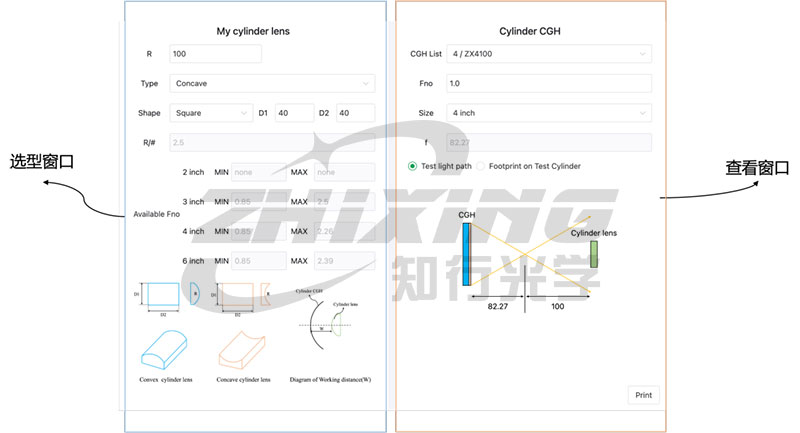
Figure 1: Overall interface diagram of the selection tool
I. Selection Window
The blue box on the left is the selection window, which has two main functions:
◆Function 1: Input Cylindrical Mirror Parameters
R: Radius of curvature of the cylindrical mirror. Enter an absolute value.
Type: Select either concave or convex.
Shape: Select the shape of the cylindrical mirror (rectangular or elliptical; square and circle are special forms of rectangle and ellipse, respectively).
D1: Aperture with curvature direction.
D2: Aperture without curvature direction.
R/#: F/# of the cylindrical mirror. This cannot be entered; it is automatically calculated.
W: When Convex is selected for Type, the working distance (axial distance CGH from the cylinder vertex) needs to be entered. For safety reasons, it is recommended to set the distance to 10 mm or more.
◆Function 2: Output Suggested Fno Ranges for Different Sizes
After inputting the relevant parameters for the cylindrical lens, the software will output suggested Fno ranges for different sizes. If the parameters for the cylindrical lens to be tested are entered in the selection box in Figure 1, the selection software will output the suggested Fno ranges as shown in Figure 2:
For 2-inch lenses, "none" will be displayed, indicating that there are no available models for 2-inch lenses. Models for 3-inch, 4-inch, and 6-inch lenses are all available.
For 3-inch displays, the Fno ranges from 0.85 to 2.5. Referring to the table in Appendix 1, three models are available for 3-inch displays: ZX3100, ZX3150, and ZX3200.
For 4-inch displays, the Fno ranges from 0.85 to 2.26. Referring to the table in Appendix 1, three models are available for 4-inch displays: ZX4100, ZX4150, and ZX4200.
For 6-inch displays, the Fno ranges from 0.85 to 2.39. Referring to the table in Appendix 1, three models are available for 6-inch displays: ZX6100, ZX6150, and ZX6200.
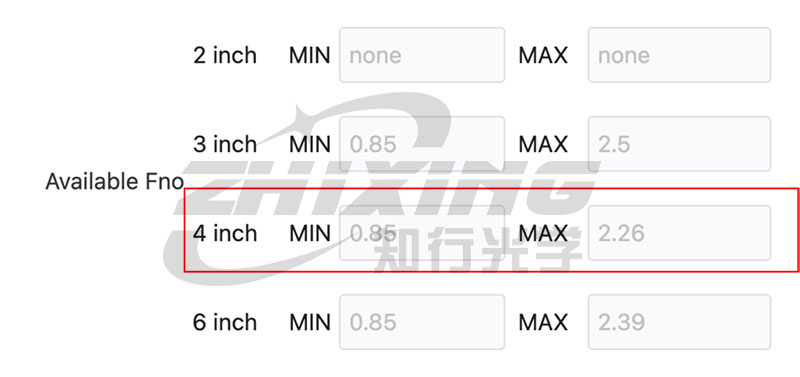
Figure 2: Recommended Model Selection
The above shows the selection of a concave surface. If a cylindrical surface with the same parameters is changed to a convex surface, the selection interface is as follows. W is the minimum distance between the CGH graphic surface and the fixed point of the convex surface (it is recommended to be more than 10 mm).
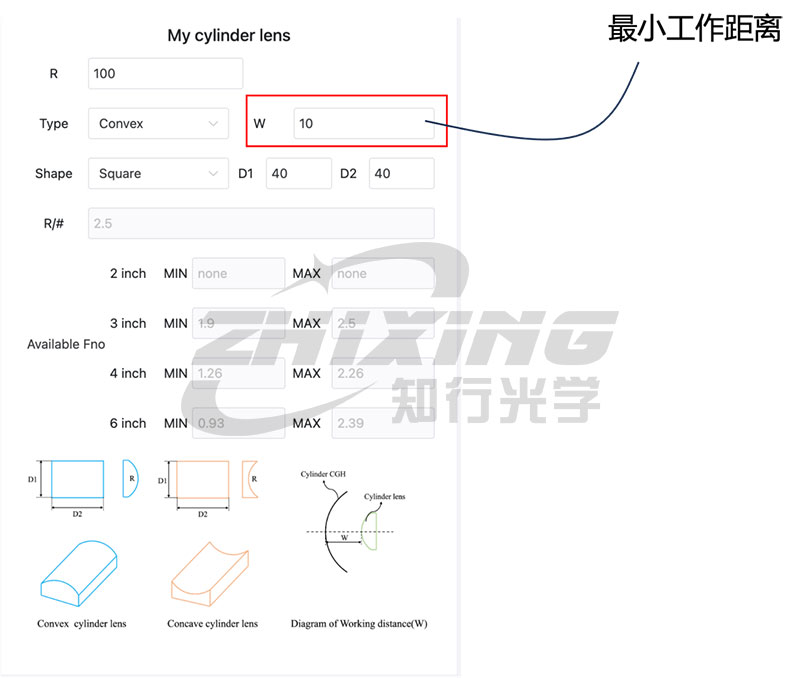
Figure 3: Convex surface selection interface
For 2-inch displays "none," indicating no available models.
For 3-inch displays, the Fno ranges from 1.9 to 2.5. Referring to Appendix 1, the 3-inch model ZX3200 can be selected.
For 4-inch displays, the Fno ranges from 1.26 to 2.26. Referring to Appendix 1, the 4-inch model ZX4150 and ZX4200 can be selected.
For 6-inch displays, the Fno ranges from 0.93 to 2.39. Referring to Appendix 1, the 6-inch model ZX6100, ZX6150, and ZX6200 can be selected.
II. View Window
The yellow box on the right is the view window, which has two main functions:
◆Function 1: View available models based on the recommended Fno range on the left.
In this example, ZX4200 is selected from the dropdown menu in the CGHlist column. Fno, Size, and F are automatically calculated.
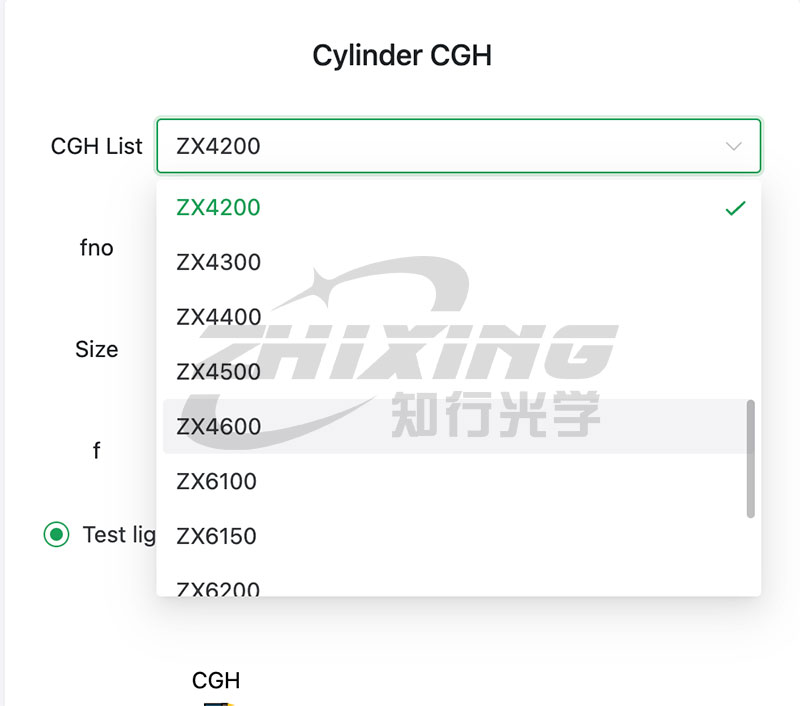
Figure 4: Model drop-down window
You can view two diagrams:
1) Optical path diagram (including distance information), as shown in Figure 5:
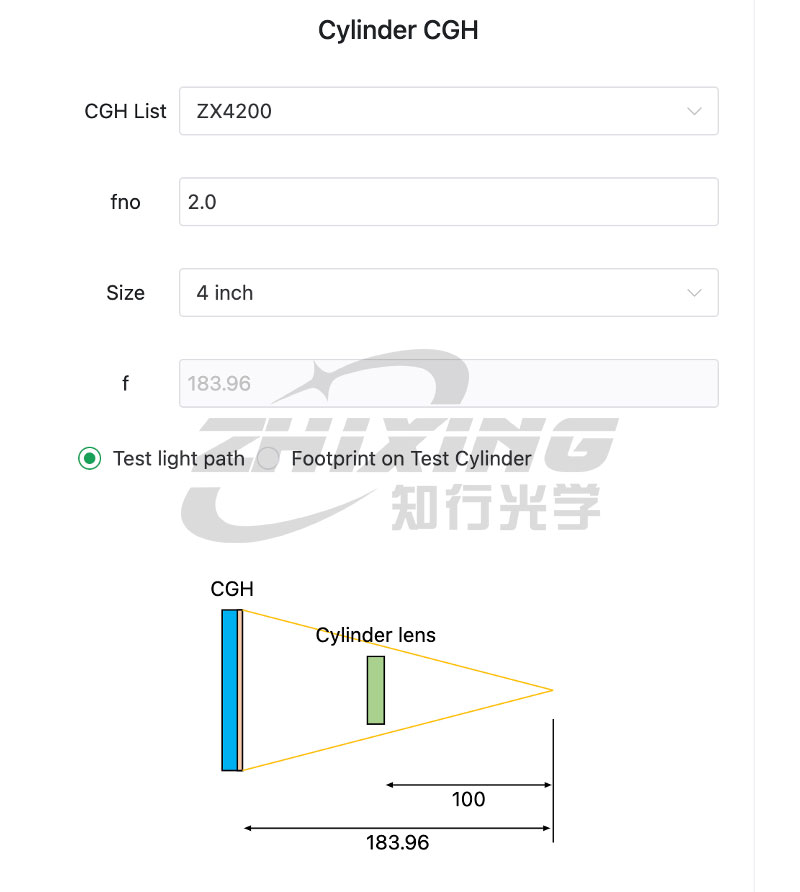
Figure 5: Test optical path diagram
2) For the concave surface in Figure 1, the spot coverage of the three models (ZX4100, ZX4150, ZX4200) of the 4-inch cylindrical CGH is shown in Figure 6. At the bottom, an Energy ratio is given. The smaller the value of the value greater than 1, the more pixels can be detected and the higher the resolution. Among the three models, ZX4200 has the smallest Energy ratio (1.26), which is higher than the other two models.
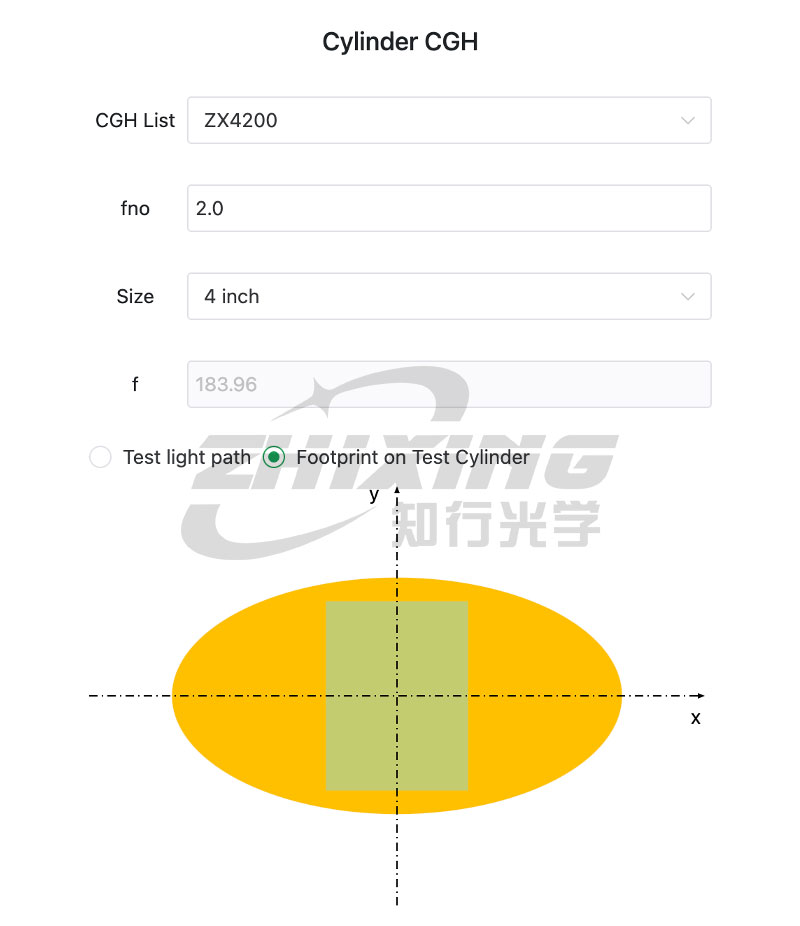
Figure 6: Light spot coverage map
◆Function 2: View Custom Models
If the suggested models on the left are outside our product model list, such as a suggested Fno between 4.3 and 4.6, and our company does not have an Fno in this range, you need to customize it. Select "Custom" in the CGHlist column, as shown in Figure 7:
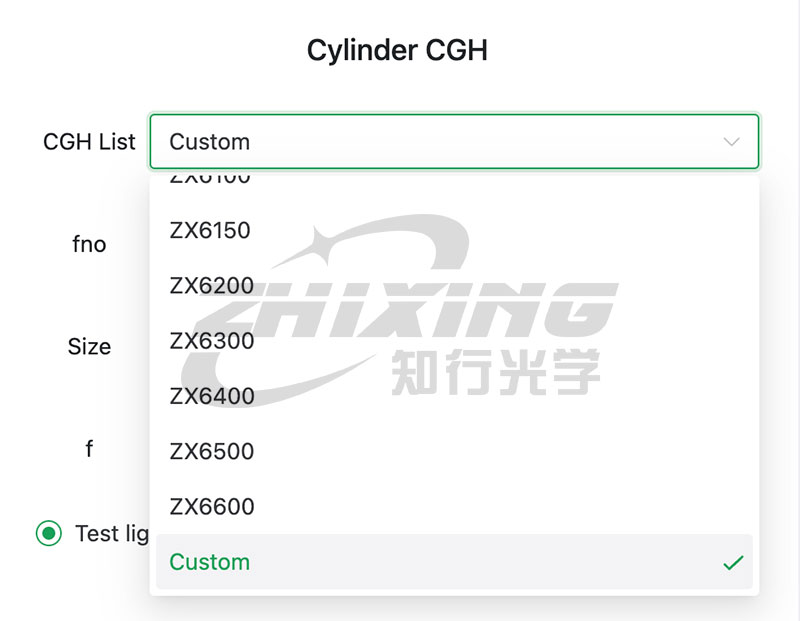
Figure 7: Selecting a Custom Model
Enter fno in the red box and select the model in the blue box. In this example, the recommended range for 4-inch Fno is [1.35 2.37]. You can define fno=2.1.
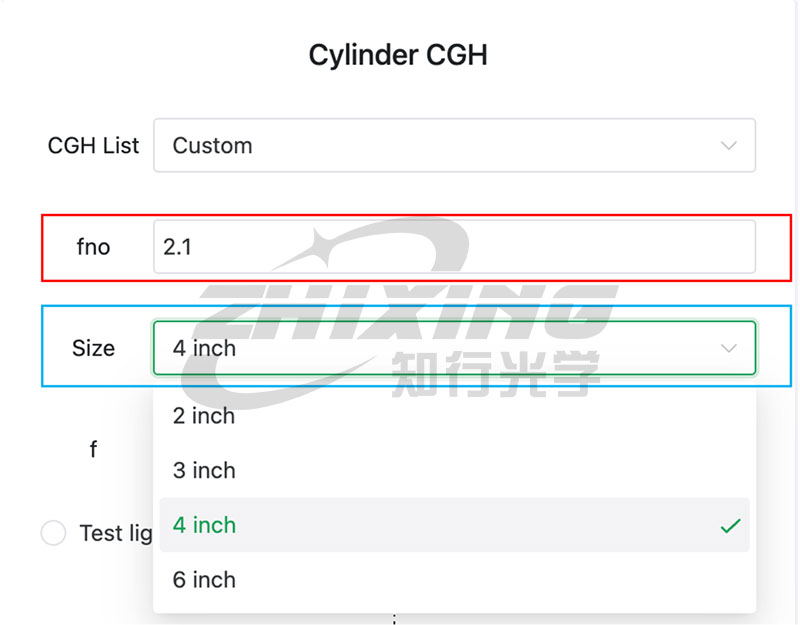
Figure 8: Example of a custom window input item
Based on the custom model number, you can view the optical path diagram and light spot coverage diagram to determine if the cylindrical lens can be tested using the custom model.
Attachment 1: List of Cylindrical CGH Models
Model Naming Explanation: ZX-ABCD: A: Represents the size of the cylindrical CGH; BCD: Represents the Fno of the cylindrical CGH.
Example 1: ZX4200 Model: 4 inches; Fno: 2.0
Example 2: ZX6100 Model: 6 inches; Fno: 1.0
A list of CGH models of different sizes is as follows:
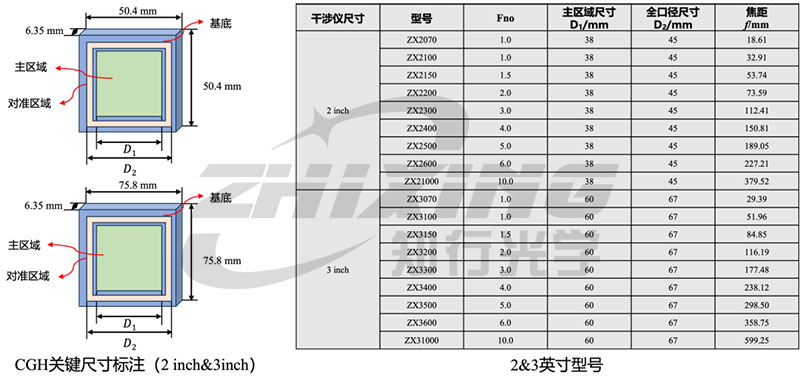
Table 1: Key Parameters of 2-inch & 3-inch Cylindrical CGH
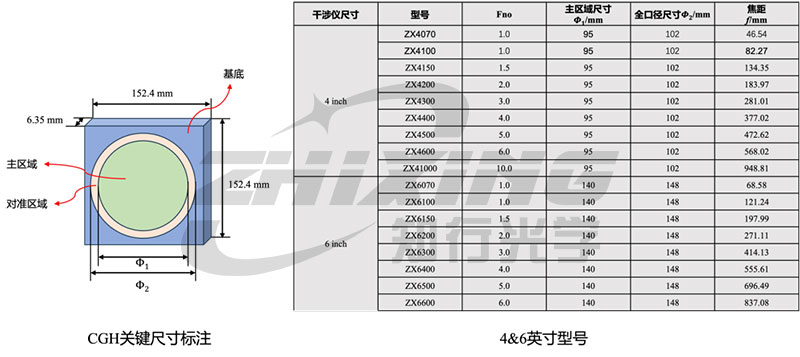
Table 2: Key Parameters of 4-inch & 6-inch Cylindrical CGH